
Whether you are a client, principal contractor, subcontractor or a health and safety practitioner, you can register your company online. Once registered, you can log in, create new construction projects and generate Covid-19 Plans or custom H&S specifications and safety files for them.
To register your company, click one of the Register links on the eSafeT web site or one of the Client, Agents or Contractors options on the eSafeT home page.

The Register screen will appear.
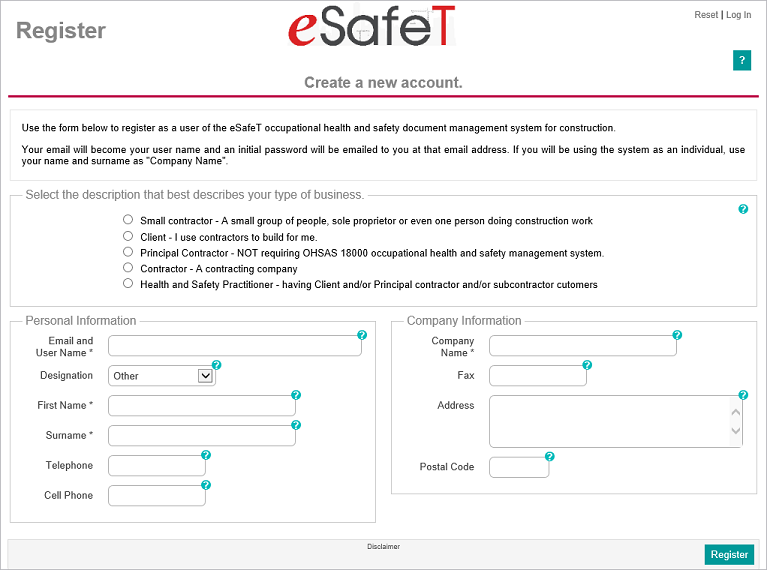
Select the description that best describes your type of business. Select:
Complete your personal details as accurate as possible. The detail will be used to pre-populate project information on the creation of a new project if you play a part in the project and will save the user a lot of time and effort if it is complete and accurate.
Enter your official email address in the Email and User Name field. This email will also become your username for logging into the eSafeT system and all future eSafeT communications will be emailed to this address. An email containing your password will be sent to this email address on registration and you will only be able to log into the system if you have access to the email account associated with this address. Login names are unique in the system so all login emails must be unique. Contact the eSafeT technical team if you are a contractor or client and need to register more than one company on a single email address.
Select your designation from the Designation drop down list if you are the CEO, managing member, sole proprietor or a safety practitioner of your company.
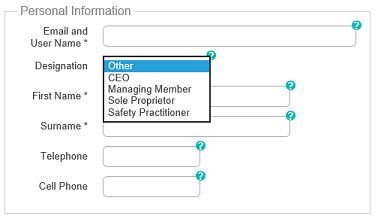
Select your designation from the Designation drop down list if you are the CEO, managing member, sole proprietor or a safety practitioner of your company. Using the correct designation is important for subsequent ease-of-use as eSafeT will use the designation to trigger the population of the relevant data fields for new projects. The details of the CEO, Managing Member or Sole Proprietor of a client or contractor will be used to populate the 16(1) details of a new project.
Enter your formal first name in the First Name field as the value may be used in the documentation. The field must be completed as it is marked with an asterisk indicating a mandatory field.
You should enter your telephone number in the Telephone field as the data will be used to pre-populate new project fields if applicable.
You should enter your cell phone number in the Cell Phone field as the data will be used to pre-populate new project fields if applicable.
You should enter your company fax number in the Fax field as the data will be used to pre-populate new project fields if applicable.
You should enter your company physical or postal address the Address field as the data will be used to pre-populate new project fields if applicable.
You should enter your company postal code in the Postal Code field as the data will be used to pre-populate new project fields if applicable.