
The Basic risk assessment process is slightly different for Specification and Safety File projects. For both types of projects, however, the level of risk assessment is specified on creation of the project. See Add Client project or Add Contractor project
Basic level Risk Assessment for Specification projects provides logged-in user with a table of predefined risk activities, effectively representing the hazards in this case and labelled as such, the risk or risks associated with each hazard, the control measures to mitigate the risk and the final rating column allowing the user to rate the risk either Low, Medium or High.
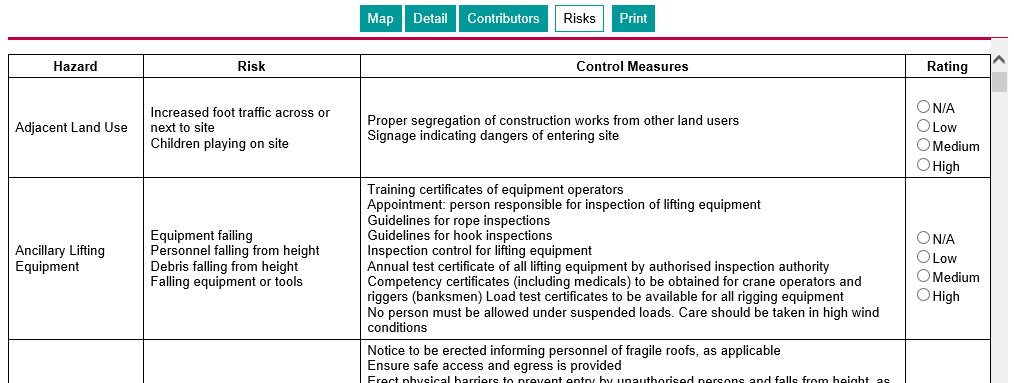
Hazards rated Low, Medium or High becomes part of the project risk profile while unrated risks are not part of the profile.
Once rated, the logged-in user can remove a hazard form the risk profile (i.e. effectively change it to "not rated) by selecting the N/A option for that row.
Basic level Risk Assessment for safety file projects provides logged-in user with a set of check-boxes representing the predefined risk activities, effectively representing the hazards in this case.
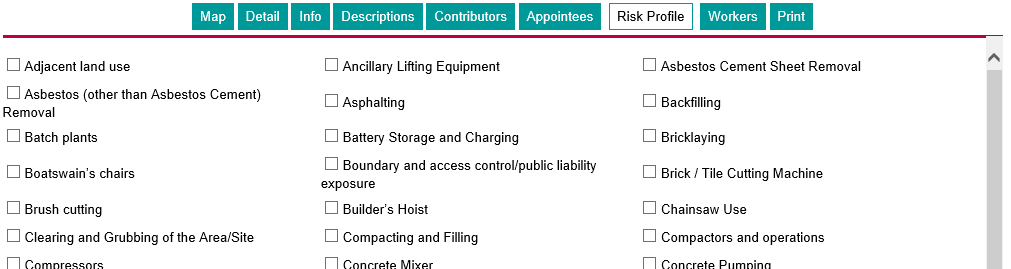
The selected activities become part of the risk profile for the projects and a table, like the one presented on-line for specification projects as shown above, is produced as part of the safety file documentation.
A Risk Assessor must complete the risk ratings by hand once the documentation is generated and printed.